The AI assistant that runs your shared inbox
Sektra turns your team's Gmail, Outlook and WhatsApp into one inbox with a memory. It keeps every promise and open question per client, sorts the day by consequence, drafts the reply, and tells you which account has gone quiet.
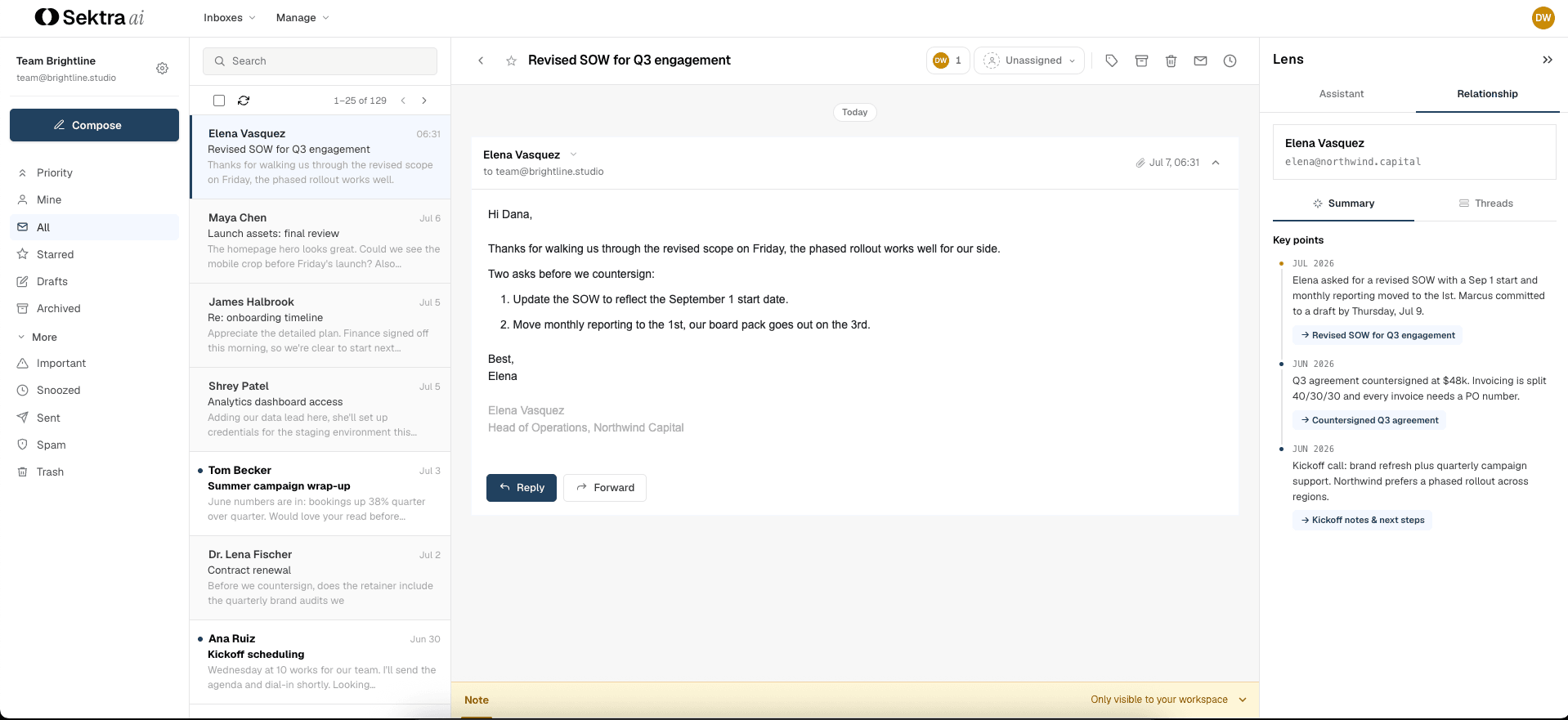
What your assistant does every day
No dashboards to babysit, no fields to fill in. The assistant reads every thread as it arrives, decides what deserves you first, remembers the rest, and follows through on whatever you hand it.
An inbox that sorts itself
Every thread scored by what it costs you to ignore and labeled by what it is asking for. You open the day already triaged.
The memory layer
Every commitment, open question and next step, per contact and per company, remembered for the whole team across email and WhatsApp.
An assistant that acts
Ask what you promised, or hand it the work: assign this, draft that, remind me Thursday, chase them if they go quiet. It answers with sources and follows through.
Action items
Reminders, watches and jobs in one queue of what you owe, ordered by time, with the bell for mentions and assignments.
One inbox for the team, sorted by what actually matters
Every shared-inbox tool hands you a queue in the order things arrived. Sektra reads each thread as it lands, on Gmail, Outlook or WhatsApp, weighs what it costs you to ignore, and puts the day in front of you already ordered. Your mail stays where it is.
Walk in briefed, every reply and every call
Open any contact and see the whole relationship rather than a pile of threads. The context buried across months of email and WhatsApp, assembled for you.
Ask it anything, or hand it the work
“What did we promise Halbrook?” “Assign the Northwind threads to Priya.” “Draft a reply confirming the audit is in scope.” It answers from your team's entire history with its sources cited, and when you hand it work it does the work: assigning, tagging, snoozing, drafting, and bringing the thread back at the moment it matters.
The queue of what you owe
Reminders that cancel themselves when the client replies. Watches that tell you when a sender writes in or goes quiet. Jobs that draft across fifty threads while you do something else. Everything you hand the assistant lands in one queue, ordered by time, and the bell covers mentions and assignments.
Reporting your leadership will read
Percentiles rather than averages, per inbox, per teammate and per client, on email and WhatsApp alike. Six views, one date range, every number defined in plain language.
Needs attention
Threads awaiting a reply, the oldest one waiting, and urgent threads nobody owns. The queue as it stands this minute.
Response performance
First response, response and resolution time as p50 and p90, with reply coverage and resolved counts, so one bad week cannot hide behind an average.
Team
Reply load and response times per teammate, sorted by replies sent, so capacity and speed are visible without a spreadsheet.
AI impact
Threads summarized and scored, mail kept out of the way, threads surfaced anyway, templates used, and the time it saved.
Commitments and deadlines
Promises and deadlines made, met and overdue, per client and per teammate, read from the conversations themselves.
Sektra's read
One narrative line on what the numbers mean for this inbox, and a definition with a worked example behind every metric.
One AI assistant for every client conversation: Gmail, Outlook and WhatsApp
Connect the channels your clients already use, and send what matters onward to the tools your team already runs. One inbox, one memory, no migration.
Connected in minutes, working from the first hour
Connect Gmail, Outlook or WhatsApp
OAuth for mail and your provider for WhatsApp. No password is stored, and you can disconnect anytime
Sektra reads the history
The memory layer builds itself from the context buried across months of threads
Your team joins one inbox
Invite teammates; every client conversation gets an owner and shared context
Ask, or hand it the work
Where do we stand? What did we promise? Ask in plain language, or tell the assistant what to do and when
Already using a shared inbox tool? Keep the inbox. Gain the assistant.
Shared inbox tools give you a tidier queue: rules, tags and tickets that organize the triage your team still does by hand. Sektra runs the inbox instead. It reads every thread, decides what needs you first, remembers what was promised, and flags the relationships cooling off.
See how Sektra comparesPlans that scale with the team
Every workspace starts with 14 days of Pro, no card required. Every AI feature is included in the plan price. Pay annually and save up to 17%.
For small teams sharing an inbox for the first time. 500 AI credits per seat, pooled.
Start freeComplete memory layer, 2,000 AI credits per seat, and 5 shared inboxes.
Start freeSAML SSO & SCIM, audit logs, custom retention, and a dedicated success manager.
Talk to salesCommon questions, answered
Still have a question about rollout, billing, or security? Talk to us and we'll walk you through it.
Get in touchWhich channels does Sektra work with?
Gmail and Google Workspace, Outlook and Microsoft 365 including shared mailboxes, and WhatsApp Business numbers. Mail connects over OAuth, WhatsApp through your provider, and one team can run all three inside the same workspace with one memory.
Do we have to move our mail out of Gmail or Outlook?
No. Sektra connects over OAuth and syncs two ways with the mail your team already uses. Nothing migrates, and nothing changes for the people writing to you or for teammates who are not on Sektra yet.
Is there a free trial?
Yes. Every new workspace starts with 14 days of Pro, no card required. Connect a inbox, invite the team, and choose Standard or Pro when the trial ends.
Is our email used to train AI models?
Never. Your mail is processed only to build your team's private memory layer and to answer your team's questions. It never trains our models or anyone else's.
How long does setup take?
Connecting a inbox takes a few minutes. Sektra then reads your existing history in the background, and most teams have a complete picture of their active clients within the first hour.
What happens to our data if we leave?
Cancel at any time. Your mail data and every memory derived from it are permanently deleted within 30 days.
How is this different from Front, Hiver, or Help Scout?
Those tools give you a tidier queue: rules, tags and tickets that organize the triage your team still does by hand. Sektra runs the inbox. It reads every thread, decides what needs you first, remembers every promise, drafts replies, sets reminders and briefs you before calls. Every AI feature is part of the plan price rather than an add-on or an upper tier.
Can the assistant do things, or only answer questions?
Both. Ask what you promised a client and it answers with links to the threads. Tell it to remind you Thursday, draft a reply, assign a thread, tag a batch, or watch an account for silence, and it does that too. Anything you hand it enters the same queue as your mail, so it resurfaces at the right moment.
What does Sektra integrate with beyond email and WhatsApp?
Sektra sends what matters outward into Slack and Microsoft Teams, through Zapier into the rest of your stack, and keeps HubSpot and Salesforce records current from real conversations. The integrations page lists each one.
How is this different from a CRM?
A CRM waits for someone to type. Sektra reads what is already in your inbox and builds the record itself: people, companies, commitments and open questions, kept current because the inbox is where the work happens. No data entry, no new habits, no maintenance.